

You already know your data is your business’s lifeblood. But the way you store, manage, and access that data can either accelerate your growth or quietly hold you back. The truth is, many organizations are still running on legacy data systems built decades ago—systems that were cutting-edge in their time, but now strain under the demands of today’s digital economy.
At SKM Group, we’ve seen first-hand how legacy database migration can transform not only your IT infrastructure, but also your agility, compliance, and scalability. It’s not just a technical upgrade. It’s a strategic decision that can secure your competitive advantage for years to come.
You can’t plan a migration until you fully grasp the legacy database meaning—and why ignoring it could cost you more than you think.
Defining Legacy Data Systems and Their Characteristics
A legacy data system isn’t just “old.” It’s any database architecture that’s no longer aligned with your current operational needs, technological standards, or security requirements. Some of these platforms still run mission-critical processes. Others are patched together with decades of updates, each layer adding complexity.
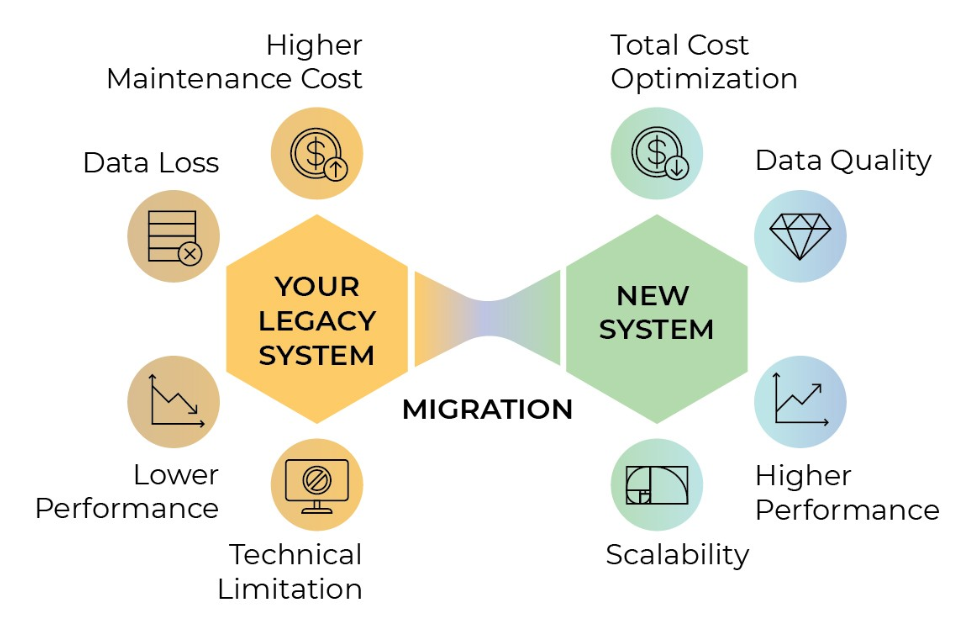
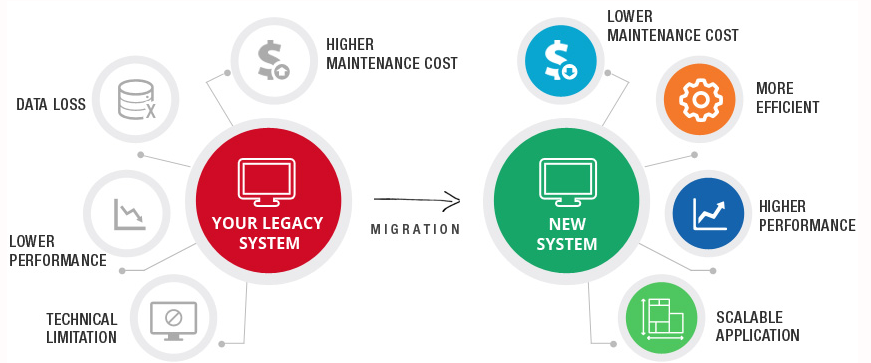
Key traits you might recognize: outdated programming languages, limited integration options, performance bottlenecks, and a lack of vendor support. Even if they still “work,” these systems often demand disproportionate resources to maintain.
Understanding the legacy data definition is the first step. Without this clarity, you’re essentially trying to remodel a building without knowing the foundation’s material.
Common Challenges with Outdated Database Architectures
Outdated databases don’t just slow you down—they expose you to risk. You might face limited reporting capabilities, storage constraints, or difficulties scaling to support modern analytics tools.
In many cases, businesses run into integration walls. You want to plug in a new CRM, connect to a real-time analytics engine, or adopt AI-driven forecasting—but the old database speaks a completely different “language.”
And then there’s talent. Fewer engineers today are trained in legacy database environments, making skilled support both expensive and scarce.
The Role of Legacy Data Definition in Modernization
Why bother with formal legacy data definition? Because it gives you a map of what you have, what’s redundant, and what’s essential. This definition phase helps you decide what to migrate, what to transform, and what to retire altogether.
By codifying this understanding, you prevent scope creep and avoid wasting resources on moving obsolete or duplicated datasets.
Risks of Ignoring Legacy Database Meaning
Ignoring the legacy database meaning isn’t harmless—it’s an active gamble. Over time, outdated databases can create:
Eventually, the cost of inaction surpasses the cost of migration.
Business Benefits of Understanding Your Legacy Environment
When you clearly understand your legacy data systems, you move from reactive IT firefighting to proactive strategy. You can forecast infrastructure investments, align your systems with growth targets, and confidently onboard emerging technologies.
You also gain leverage in vendor negotiations—knowing exactly which features and integrations you need, rather than accepting an off-the-shelf package.
Get reliable, results-driven IT services with SKM Group’s proven approach: Explore SKM Group services.
The right time isn’t always obvious, but there are clear triggers. If your operational costs keep climbing, if downtime is more frequent, or if your database can’t meet regulatory standards, you’re already overdue.
Sometimes, the driver is market opportunity. You may need real-time analytics for faster decision-making, or cloud scalability to support global expansion. If your existing platform can’t deliver, it’s time to migrate.
At SKM Group, we often advise clients to act before the pain becomes critical. Migration is far smoother when you’re not racing against a security breach, a failed audit, or a sudden loss of vendor support.
Legacy data conversion isn’t just copying old tables into a shiny new database. It’s about translating, cleansing, and restructuring your data so it works flawlessly in its new home.
You’ll need to assess the current schema, identify transformation rules, and ensure mapping accuracy. You’ll also have to decide whether to perform the migration in stages or as a single cutover.
The smartest strategies are built on a deep understanding of your business processes. Migrating is pointless if the new system doesn’t reflect the workflows and KPIs that matter to you.
Migrating is one thing. Managing your data long-term is another. A well-chosen legacy data management system keeps your infrastructure resilient and adaptable.
Migration Frameworks and Platform Overviews
Modern frameworks can automate much of the heavy lifting. Whether you’re moving to AWS, Azure, Google Cloud, or an on-prem hybrid, you’ll find specialized platforms that handle schema mapping, data validation, and performance optimization.
The choice comes down to compatibility with your existing architecture, scalability, and long-term maintainability.
Automating Legacy Data Code Search for Efficient Refactoring
The legacy data code search process identifies embedded queries, stored procedures, and application-level calls to your old database. Automating this step can save months of manual review and significantly reduce human error.
Automation tools scan source code to flag dependencies, making it easier to refactor applications for the new environment.
Ensuring Data Integrity During Legacy Data Conversion
Data integrity is non-negotiable. This means building validation checks into every stage of the legacy data conversion. Think row counts, checksum comparisons, and business-rule validations.
Even a single mismatch can cause downstream errors, so your migration plan must include pre- and post-conversion audits.
Bridging New Applications with Legacy Data Systems
Sometimes, full migration isn’t immediate. You might need to run new applications alongside existing legacy data systems for months or even years. Middleware and API gateways can bridge these environments, enabling gradual transition without disrupting operations.
Post-Migration Monitoring and Validation
The project doesn’t end when the migration script finishes. Post-migration monitoring ensures performance benchmarks are met, indexes are optimized, and queries return expected results.
Validation isn’t just about numbers matching—it’s about verifying that business processes operate exactly as intended in the new system.
Before you even think about data extraction, start with a thorough legacy data code search. Identify where and how your applications interact with the database. Trace dependencies across different systems, including reporting tools, batch jobs, and APIs.
This discovery phase prevents you from breaking mission-critical functionality during migration. It also gives you a clearer picture of the refactoring workload ahead.
Keep your business agile by outsourcing IT management to SKM Group: Learn about IT outsourcing.
Ownership of your legacy data management system isn’t just a technical question—it’s a governance issue. You need to clearly define responsibility for oversight, decision-making, and budget allocation.
In some organizations, IT carries the entire load. In others, ownership is shared between IT, compliance teams, and business units that rely heavily on the data. The danger comes when no one truly “owns” it, leading to fragmented policies, slow decision cycles, and missed opportunities.
At SKM Group, we recommend appointing a dedicated data owner with both technical literacy and strategic authority. This role bridges the gap between tech execution and business priorities, ensuring migrations align with larger corporate goals.
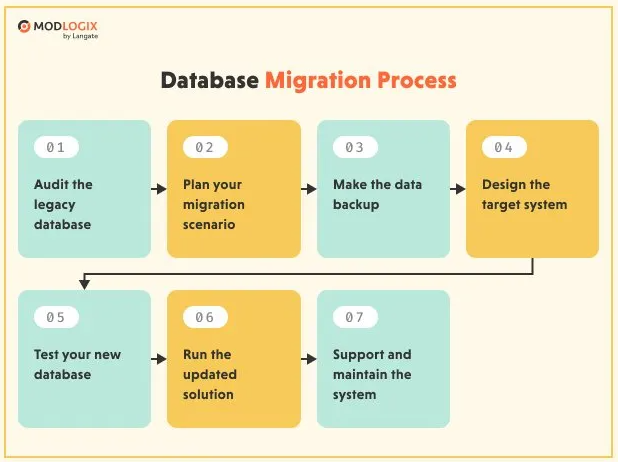
A well-run legacy database migration is methodical, transparent, and backed by contingency plans. Here’s how to execute it without derailing daily operations.
Begin with a full inventory of databases, schemas, stored procedures, and related applications. Document versions, dependencies, and data quality issues. This isn’t busywork—it’s the blueprint for your migration. Without it, you risk overlooking critical elements.
Your target architecture must serve today’s needs and tomorrow’s ambitions. Will you adopt a cloud-native model? A hybrid setup? An on-premises system with modern tooling?
This design stage should account for scalability, disaster recovery, compliance standards, and integration points with your existing tech stack.
Automated migration scripts are your workhorses. They handle data extraction, transformation, and loading into the new environment. Test these scripts on non-production datasets first to uncover performance issues or mapping errors before they affect live systems.
A pilot legacy data conversion validates your migration process under realistic conditions. It exposes bottlenecks, highlights unexpected dependencies, and confirms your rollback plan works. Think of it as a dress rehearsal before opening night.
Once the pilot is refined, it’s time for full deployment. However, for mission-critical systems, a "hope for the best" approach is not an option. You must ensure business continuity even if the migration encounters unexpected errors.
This requires a robust rollback strategy. Before the final cutover, establish automated snapshots and checkpoints that allow you to revert to the previous stable state instantly. This safety net minimizes downtime and protects your organization from data loss. Execute with discipline, keep stakeholders informed, and monitor performance metrics in real-time.
Migrating away from outdated legacy data systems isn’t just an IT initiative—it’s a business survival strategy. By understanding the legacy database meaning, strategically planning legacy data conversion, and leveraging the right legacy data management system, you position your organization to innovate faster, operate more efficiently, and meet future demands with confidence.
Don't let technical debt dictate your future.
Migrating mission-critical data requires more than just tools — it demands a strategic partner.
Schedule a brief consultation with our Solutions Architect to discuss a safe migration roadmap tailored to your infrastructure.

Legacy database migration is the process of transferring data from outdated or inefficient systems to modern platforms. It often involves reformatting, restructuring, and validating data to ensure compatibility. The goal is to enhance performance, scalability, and accessibility. Migration supports digital transformation by enabling integration with new technologies. It’s a crucial step toward building a data-driven, future-ready organization.
Outdated databases are slow, insecure, and difficult to maintain. They can’t support advanced analytics, automation, or cloud-based services. Modernizing eliminates these limitations while improving data consistency and compliance. A modern database also enhances collaboration and decision-making through real-time access. Without migration, businesses risk falling behind competitors who leverage faster, smarter data systems.
Common challenges include data loss, downtime, and compatibility issues. Migrating large or complex datasets can strain systems and disrupt operations. Additionally, poorly structured legacy data may need cleansing before transfer. Security during migration is another critical concern. Thorough planning, testing, and backup strategies are essential to minimize risks.
Migrating to cloud databases like AWS RDS, Azure SQL, or Google Cloud Spanner brings flexibility and scalability. The cloud enables pay-as-you-go pricing, reducing infrastructure costs. It also improves performance with automated scaling, redundancy, and security features. Cloud migration simplifies maintenance and ensures access to the latest innovations. It’s the fastest way to modernize legacy data systems efficiently.
Data validation ensures that information transferred remains accurate and intact. It involves comparing pre- and post-migration datasets to detect discrepancies. Validation scripts and tools verify data completeness and integrity. This step guarantees that business operations continue seamlessly after migration. Neglecting validation can lead to corrupted data and operational disruptions.
Automation tools streamline migration by handling repetitive tasks such as schema mapping, data transformation, and verification. Platforms like AWS DMS or Azure Data Factory reduce human error and downtime. Automation accelerates the process while ensuring consistency and reliability. It also allows real-time monitoring of migration progress. Automated migration is faster, safer, and more cost-efficient than manual approaches.
A modern database architecture enables seamless integration with analytics, AI, and cloud services. It enhances performance, ensures regulatory compliance, and provides real-time insights. Scalable systems can adapt to new technologies and data growth effortlessly. Modernization also strengthens cybersecurity through advanced encryption and monitoring. Ultimately, database migration transforms legacy infrastructure into a strategic, long-term asset.
To ensure business continuity, especially for mission-critical systems, we employ a strategy of parallel running and incremental migration (the Strangler Fig pattern). This allows the new system to gradually take over functionality while the legacy system remains active as a fail-safe. Additionally, we prepare detailed rollback plans to instantly revert changes if any performance anomalies are detected during the cutover.


In our team, Dominik Bigosiński is responsible for driving the growth of online businesses through the strategic use of content. As an expert in his field, he has collaborated with organizations from the US, UK, Norway, and Poland since 2018, contributing to the development of over 100 blogs and supporting more than 450 B2B and e-commerce brands worldwide. His passion for conscious personal growth and philosophy is reflected in his work, where he focuses on delivering thoughtful, audience-centered strategies that drive long-term results.
Transform your outdated system into a modern, high-performance tool. See our approach.
Discover moreStrategic insights into technology, software development, and digital growth

At SKM Group, we spend a lot of time talking with decision-makers who feel pressure to modernize simply because their systems are old. Age, however, is not a technical argument.
Modernizing a legacy system is never a purely technical exercise. It is a strategic decision that directly affects your revenue streams, operational resilience, compliance posture, and long-term ability to innovate.

Legacy modernization is not a technology project. It is a business survival initiative disguised as engineering work. At SKM Group, we see legacy transformation as a controlled dismantling of risk

Legacy software modernization is often presented as a straight path from technical limitation to digital freedom. In reality, it is one of the most complex transformation efforts an organization can undertake.

When your software is intuitive, seamless, and genuinely pleasant to use, adoption rises, support costs drop, and your brand reputation grows stronger with every click.
Managing software today isn’t just about having the right tools–it’s about using them efficiently, legally, and strategically. In an era where cloud subscriptions, SaaS models, and hybrid deployments dominate IT ecosystems.
You already know your data is your business’s lifeblood. But the way you store, manage, and access that data can either accelerate your growth or quietly hold you back.

Legacy software modernization is the structured process of updating, transforming, or replacing outdated software systems to meet modern business needs.

Legacy software isn’t just “old code.” It’s a critical part of your business that’s grown increasingly fragile with time. Often custom-built and once state-of-the-art, your legacy systems likely hold together years of operational knowledge.

Modern business runs on software. But if your operations are still leaning on decades-old systems, you're probably feeling the drag. At SKM Group, we’ve worked with countless companies

Legacy software modernization refers to the process of updating, improving, or completely transforming outdated software systems - often referred to as legacy software
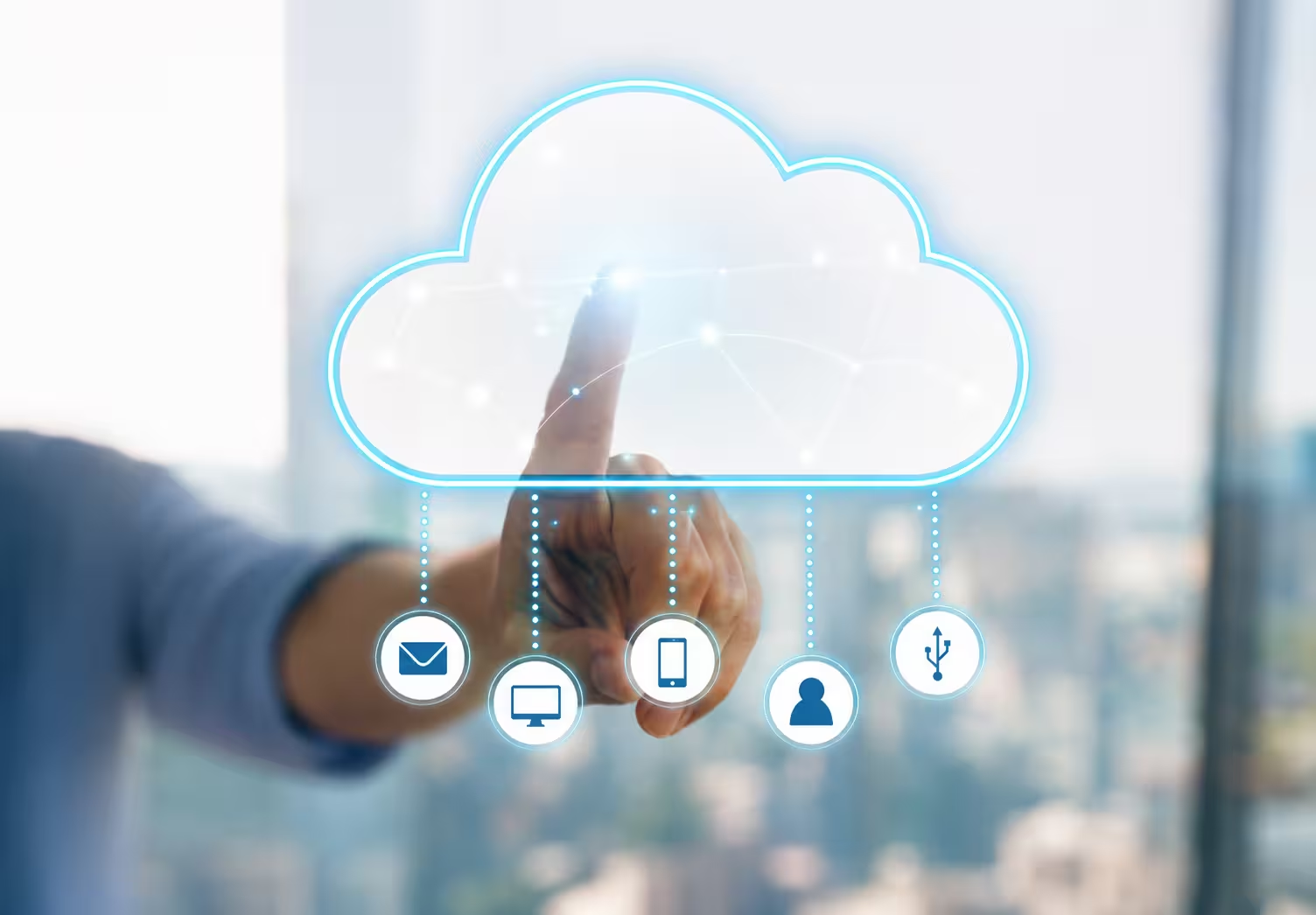
Cloud migration refers to the movement of applications, data, and other business entities from on-premise to a cloud-based environment. It can occur in public, private, or hybrid clouds based on your specific business needs and technical requirements

If you're leading a business in the digital age, you've likely heard about legacy software modernization. But what does it truly mean, and why is it such a hot topic in the tech world today?
%20(1).avif)
Businesses often face a key problem: integrating legacy systems with modern technology to keep operations agile and secure. At SKM Group, we understand that legacy system integration is not just about adopting new solutions but also about prese

Comments