

Discover everything you need to know about Managed IT Services, including key

Technology is the backbone of modern business, and Managed IT Services have become the key to maintaining a secure, efficient, and scalable IT environment. Whether you run a small startup or a global enterprise, Managed IT Service Providers offer a proactive approach to IT management, allowing you to focus on core business operations while experts handle the technical complexities.
This guide will walk you through everything you need to know about Managed IT Support Services, from their definition and core components to the Managed IT Services benefits that can transform your business.
At its core, Managed IT Services refer to outsourcing IT management, support, and security to a third-party provider. Unlike traditional IT support, which is often reactive, Managed IT Solutions focus on proactive monitoring, maintenance, and long-term strategy.
A Managed IT Service Provider (MSP) takes full responsibility for managing an organization's IT infrastructure, ensuring optimal performance, security, and compliance. This service model allows businesses to reduce costs, minimize downtime, and enhance operational efficiency.
What Does Managed IT Support Services Include?
The scope of Managed IT Support Services varies based on the provider and the needs of the business. However, most Fully Managed IT Service offerings include:
Who Provides Managed IT Services? A Breakdown of Roles
Not all Managed IT Service Providers operate the same way. Some cater to small businesses with basic support, while others specialize in enterprise-level infrastructure management.
Key players in the Managed IT Services industry include:
Why Are Fully Managed IT Services Gaining Popularity?
The demand for Fully Managed IT Service solutions has surged due to several key factors:
How Managed IT Services Differ from Traditional IT Support
Traditional IT support is often reactive, meaning issues are addressed after they occur. In contrast, Managed IT Services provide continuous monitoring and proactive maintenance to prevent downtime and security breaches.
Key differences include:
One of the core elements of IT Managed IT Services is Remote Monitoring and Management (RMM). This technology enables real-time tracking of IT systems, detecting issues before they escalate.
RMM tools automatically identify vulnerabilities, optimize system performance, and provide immediate alerts if a problem arises. With Managed IT Support Services, businesses can eliminate downtime, data loss, and security breaches by addressing potential threats proactively.
IT Managed IT Services for Data Backup and Recovery
Data loss can cripple a business, whether due to hardware failure, cyberattacks, or human error. Managed IT Services Providers ensure automated, secure, and redundant backups, protecting critical business information.
A robust backup and disaster recovery plan includes:
Managed Security Services: Protecting Your IT Infrastructure
With the increasing number of cyber threats, Managed Security Services have become a critical part of Managed IT Support Services. A Managed IT Service Provider helps businesses stay protected by implementing firewalls, endpoint protection, and security monitoring.
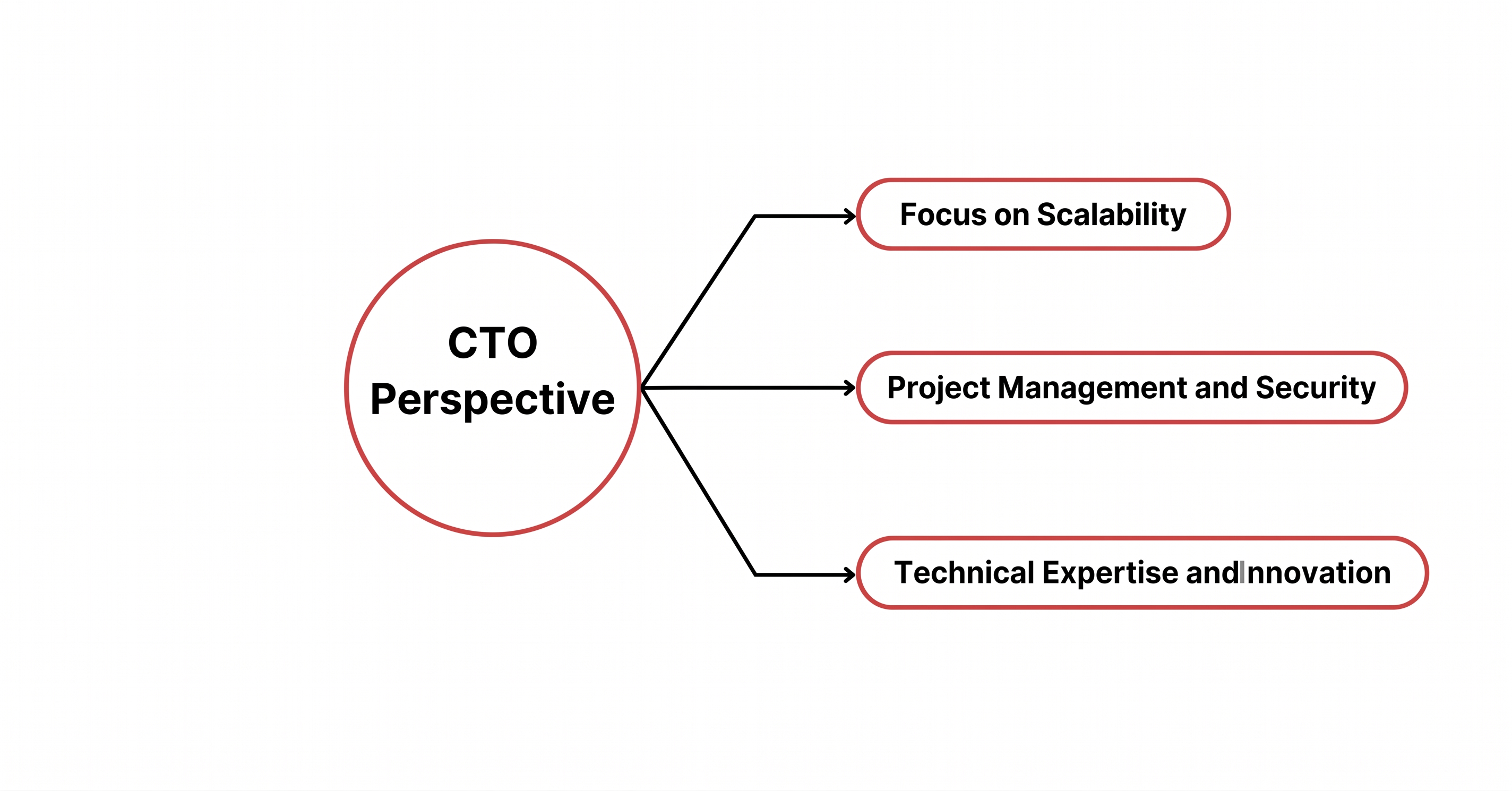
Key security services include:
Cloud Integration with Managed IT Service Providers
Cloud computing is redefining IT infrastructure, and Managed IT Services Providers play a crucial role in optimizing cloud environments. Whether you use AWS, Microsoft Azure, or Google Cloud, a Managed IT Solutions Provider ensures that your cloud applications run smoothly, securely, and cost-effectively.
Services include:
Proactive IT Support for Business Continuity
Unlike traditional break-fix models, Managed IT Services emphasize proactive support, ensuring business continuity even in the face of IT disruptions.
By implementing preventative maintenance, monitoring IT health, and deploying failover systems, a Managed IT Service Provider helps businesses avoid costly downtime, enhance productivity, and maintain seamless operations.
A Managed IT Service Provider works as an extension of your business, managing your IT infrastructure while allowing you to focus on strategic growth.
Here’s how it typically works:
By leveraging Managed IT Services, businesses can eliminate IT headaches, reduce risk, and stay ahead of technological challenges.
Technology is the driving force behind business growth, but maintaining a secure and efficient IT environment can be a challenge. Managed IT Services provide a structured approach to IT management, eliminating the burden of troubleshooting, patching, and monitoring from your internal teams. Instead of dealing with IT crises, you can focus on strategic business goals while experts handle the complexities of network security, cloud computing, and data management.
One of the biggest advantages of Managed IT Support Services is cost efficiency. Instead of unpredictable IT expenses, businesses benefit from a fixed monthly fee, making budgeting easier. Additionally, companies gain access to enterprise-grade IT infrastructure without the need for large capital investments. Scalability is another major benefit—Managed IT Services Providers can easily adjust their services as your company grows, ensuring that IT solutions evolve alongside your business needs.
Security is another crucial factor. Fully Managed IT Service solutions include comprehensive cybersecurity measures, ensuring protection against evolving threats like ransomware, phishing, and data breaches. Compliance with industry regulations is also streamlined, as Managed IT Services Providers help businesses meet legal and regulatory requirements with minimal effort.
Not all Managed IT Service Providers offer the same level of expertise and reliability. Selecting the right partner is crucial to ensure a seamless IT experience. The decision-making process should be based on several key factors.
Reputation and Experience of the Provider
When choosing a Managed IT Solutions Provider, industry reputation matters. A provider with a strong track record demonstrates reliability and expertise. Look for companies that have experience working with businesses of your size and industry. Customer testimonials, case studies, and third-party reviews can give you insight into a provider’s capabilities and reliability.
Scalability and Flexibility in Services
Your IT needs will evolve over time, and your Managed IT Service Provider must be able to adapt. Whether you're expanding your business, migrating to the cloud, or integrating new software, your provider should offer flexible solutions that can scale with your company.
Cost-Effectiveness of Fully Managed IT Services
Cost is always a critical factor, but cheaper is not always better. A Fully Managed IT Service package should offer value through proactive monitoring, security, and support. Instead of focusing solely on price, consider the long-term benefits, such as reduced downtime, enhanced security, and IT efficiency.
Availability of Customizable IT Solutions
Your business has unique IT outsourcing requirements, and a one-size-fits-all approach won't work. The best Managed IT Services Providers offer customizable solutions, allowing you to select only the services you need. Whether you require full IT outsourcing or support for specific functions, flexibility is key.
Support and Response Time Standards
Downtime can be costly, and fast response times are crucial. A Managed IT Service Provider should offer clear service level agreements (SLAs) that outline response times for different types of issues. Look for 24/7 support availability, ensuring that IT issues are resolved quickly and efficiently.
While Managed IT Services offer numerous benefits, businesses may face challenges when implementing them. One common issue is lack of internal IT knowledge, which can make transitioning to an external provider difficult. Clear communication between internal teams and the Managed IT Services Provider is essential to ensure a smooth integration process.
Another challenge is choosing the right level of service. Some businesses may overpay for unnecessary features, while others may underestimate their IT needs and end up with insufficient support. A thorough IT infrastructure assessment will help you determine which services are essential.
Security concerns also arise when outsourcing IT management. Handing over sensitive data to a third party requires a high level of trust. It's crucial to select a Managed IT Solutions Provider with robust security measures and compliance certifications.
Enhanced Efficiency Through Proactive Support
One of the major advantages of Managed IT Services is the ability to prevent issues before they happen. Instead of dealing with costly downtime and reactive fixes, businesses benefit from continuous monitoring, security updates, and proactive maintenance. This ensures smooth operations, improved system performance, and fewer IT-related disruptions.
Cost Savings with Predictable IT Budgets
Traditional IT management often involves unexpected repair costs, hardware failures, and software licensing issues. With Managed IT Support Services, businesses pay a predictable monthly fee, allowing for better financial planning. Additionally, proactive maintenance reduces the risk of expensive downtime, making Managed IT Services a cost-effective solution.
Access to Expert IT Professionals
Hiring an in-house IT team can be expensive, especially for small and mid-sized businesses. Managed IT Service Providers give you access to highly skilled IT professionals without the overhead costs of salaries, training, and benefits. This means you get enterprise-level expertise at a fraction of the cost.
Improved Security and Compliance
Cybersecurity threats are evolving, and staying ahead requires constant monitoring, patching, and compliance updates. Managed IT Services Providers handle security management, ensuring firewall protection, endpoint security, intrusion detection, and compliance with industry standards. This minimizes the risk of data breaches and regulatory fines.
Focus on Core Business Goals
Managing IT internally can be time-consuming and distracting. With Managed IT Services, you can shift your focus from IT maintenance to strategic business growth. Instead of troubleshooting IT issues, your team can concentrate on innovation, customer service, and operational excellence.
Real-world examples demonstrate the impact of Managed IT Services on business operations. For instance, a mid-sized e-commerce company struggling with frequent website outages and security breaches partnered with a Managed IT Service Provider to implement 24/7 monitoring and advanced cybersecurity measures. As a result, downtime decreased by 90%, and customer trust improved significantly.
Another case involved a financial firm that faced compliance challenges with evolving regulations. By outsourcing IT management, the company ensured full compliance with data protection laws, streamlined reporting processes, and strengthened cybersecurity—all while reducing IT costs by 30%.
These cases highlight how Managed IT Services can enhance reliability, security, and operational efficiency across various industries.
Create high-performing software solutions customized for your business with SKM Group: Explore custom software development.
Step 1: Assessing Your IT Needs
Before selecting a Managed IT Services Provider, evaluate your current IT environment. Identify weaknesses, security gaps, and areas that need improvement. This assessment will help determine which services you require.
Step 2: Choosing a Managed IT Service Provider
Research potential Managed IT Solutions Providers and compare their expertise, pricing, and service offerings. Look for providers with experience in your industry and strong client testimonials.
Step 3: Setting Clear Expectations and SLAs
Define service level agreements (SLAs) to ensure clear expectations regarding response times, security protocols, and issue resolution. This prevents misunderstandings and ensures accountability.
Step 4: Regularly Reviewing Service Performance
IT needs change over time, and your Managed IT Services should evolve accordingly. Conduct regular performance reviews with your provider to ensure the services align with your business goals.
Step 5: Adapting to Evolving Business Needs
As your company grows, your IT requirements will expand. A Managed IT Service Provider should offer scalable solutions to accommodate business growth, technological advancements, and security challenges.
The modern business landscape demands secure, scalable, and cost-effective IT solutions. By leveraging Managed IT Services, companies can reduce IT complexities, enhance cybersecurity, and optimize performance—all while maintaining predictable costs.
Whether you’re a startup, mid-sized enterprise, or large corporation, outsourcing IT management to a Managed IT Service Provider can be the key to long-term efficiency and growth. Instead of worrying about IT failures, you can focus on innovation, expansion, and staying ahead in a competitive market.
Are you ready to transform your IT operations? Partner with SKM Group and unlock the full potential of Managed IT Services today.

Managed IT Services refer to outsourcing IT management, support, and security to a third-party provider. Instead of handling IT issues internally, businesses rely on a Managed IT Service Provider (MSP) to monitor, maintain, and optimize their IT infrastructure. These services typically include 24/7 monitoring, cybersecurity, data backup, cloud management, and helpdesk support.
Small businesses often lack the resources and expertise to manage IT effectively Managed IT Services provide enterprise-level IT support at an affordable cost helping small businesses reduce downtime improve security and scale their IT infrastructure without major investments Instead of dealing with costly IT failures small businesses can focus on growth while experts handle technology challenges.
MSPs offer a wide range of services, including server and network monitoring, data backup, disaster recovery, and cybersecurity protection. Many also handle cloud infrastructure, software updates, and compliance management. Some providers specialize in specific areas like VoIP management, endpoint protection, or remote work solutions. The exact offerings vary by provider, but the goal remains consistent—optimizing IT performance and minimizing risk. A reliable MSP acts as an extension of your internal IT team.
The primary advantages include cost savings, improved security, and access to cutting-edge technology. Businesses benefit from predictable monthly expenses rather than unexpected repair bills. Managed providers bring specialized expertise and use enterprise-grade tools that small teams often can’t afford. They also ensure compliance with industry standards and best practices. Ultimately, Managed IT Services help organizations operate more efficiently and securely.
Selecting the right MSP requires assessing their experience, certifications, and service-level agreements (SLAs). Businesses should look for providers that understand their industry-specific challenges and regulatory requirements. It’s also essential to evaluate response times, communication quality, and scalability. Transparent pricing and proactive support are signs of a trustworthy partner. The best MSPs align with your business goals and evolve alongside your technology needs.
One of the biggest mistakes is choosing a provider based solely on cost rather than expertise or reliability. Others include failing to define clear SLAs, overlooking data security, or maintaining poor communication. Businesses sometimes underestimate the need for internal coordination during onboarding. Avoiding these mistakes ensures a smoother transition and stronger results. A good partnership depends on collaboration, trust, and transparency from both sides.


In our team, Dominik Bigosiński is responsible for driving the growth of online businesses through the strategic use of content. As an expert in his field, he has collaborated with organizations from the US, UK, Norway, and Poland since 2018, contributing to the development of over 100 blogs and supporting more than 450 B2B and e-commerce brands worldwide. His passion for conscious personal growth and philosophy is reflected in his work, where he focuses on delivering thoughtful, audience-centered strategies that drive long-term results.
Hire our experienced IT experts. Flexible, effective, and ready to start.
Discover moreStrategic insights into technology, software development, and digital growth

At SKM Group, we often tell our clients that building software is only the first chapter of the story. The rest of the book is the software maintenance process—the continuous effort required to keep your system healthy, secure, scalable.

The speed of change is ruthless. Systems that once powered your business can quickly become the anchors that hold it back. At SKM Group, we’ve seen this story unfold across industries.

Technology moves fast. Your clients move faster. And when systems stop working, even for a moment, your business feels the weight instantly. That’s where an IT Helpdesk becomes.

When you're steering a tech-driven business, every dollar invested in software must work harder and smarter. Outsourcing lets you harness global expertise while minimizing overhead and accelerating delivery timelines.

If you're evaluating how to accelerate digital initiatives while staying lean, software development outsourcing delivers a precise answer. By partnering with external experts, you tap into specialized skills and proven delivery processes

Nearshore Software Development Outsourcing is the strategic delegation of software engineering tasks to external teams located in neighboring or nearby countries. It’s not just about saving money—it’s about alignment.

Evaluate an outsourced development team for your legacy stack. Cut sprint delays, reduce IT overhead by 30%, and integrate .NET engineers in 6 weeks..

Software Development Nearshore refers to outsourcing your software projects to teams in neighboring or nearby countries. It's a model that balances cost-efficiency with strategic proximity.

Software outsourcing means handing over your software development to an external partner, often located in another country or region. It’s not just about cutting costs—although that's a common reason.

In 2025, selecting the right Software Development Outsource Company is no longer just a matter of cost—it's a mission-critical decision that impacts scalability, security, and competitive edge.

Every modern business relies on technology to stay competitive. But maintaining IT infrastructure, security, and efficiency in-house can be overwhelming and costly. This is where Managed Services in IT come in.

By outsourcing IT operations and infrastructure management to expert providers, companies can focus on their core business activities without the burden of handling complex IT tasks internally.
Technology is the backbone of modern business, and Managed IT Services have become the key to maintaining a secure, efficient, and scalable IT environment. Whether you run a small startup or a global enterprise, Managed IT Service Providers offer.

As a small business owner, you likely wear many hats. From managing operations to driving growth, your plate is always full. That’s where IT outsourcing for small businesses comes in—a strategic solution to offload technical responsibilities

Properly selecting a web development company is one of the most important decisions you must make, significantly affecting your project's success. In the US alone, there are approximately 4.3 million software houses;

Discover the world of .NET development in this comprehensive guide. Learn what a .NET developer does, the skills needed, and the importance of .NET technology in building scalable and reliable applications.

Discover effective strategies for managing IT costs in a rapidly changing technological landscape. Learn how flexible budgeting, forecasting, and prioritizing investments can help businesses save money while enhancing profitability and competitivenes

Discover why soft skills are as vital as technical expertise for programmers. Explore the growing importance of communication, collaboration, and empathy in software development.

Explore the pros and cons of desktop, remote, and hybrid work models in the IT industry. Learn how these models impact productivity, employee satisfaction, and competitive advantage, with a focus on IT outsourcing and custom software development.

Discover the environmental impact of the IT industry, from carbon emissions and energy consumption to raw material extraction and e-waste. Learn how sustainable practices can mitigate these effects, leading to a greener digital future.

Navigating remote work and IT outsourcing? Discover how to leverage the cultural and geographic diversity of international teams to drive innovation while addressing common challenges.

Inclusive software enhances user engagement and promotes a positive brand image, making it a strategic business asset. Create inclusive software designs that cater to all users, regardless of their abilities, age, or cultural background.

Discover how IT outsourcing revolutionizes HR management, enhancing agility and efficiency. Explore benefits like cost reduction, access to global talent, and streamlined processes.

Discover the importance of accurate technical skills assessment in IT recruitment. Explore methods like technical interviews, online tests, live coding, and homework assignments.

Explore the role of soft skills in diverse IT roles, from programming to client interactions, and learn how they contribute to effective collaboration, innovative problem-solving, and lasting client relationships.

Learn best practices for managing your IT outsourcing team and turning challenges into growth opportunities. Learn about the different types of outsourcing contracts
.avif)
Ready to revolutionize your IT strategy? Learn the top 5 factors for choosing the perfect outsourcing partner. How can understanding your business needs drive IT success? Who are the key players in the global IT outsourcing market?

In the tech world, companies often face a common problem - employees leaving. This is especially tricky when it comes to IT developers. As the need for specific skills grows and the competition for the best IT experts gets tougher.

In the dynamic landscape of software creation, where innovation and efficiency are paramount, the concept of IT outsourcing has emerged as a strategic alternative that's catching the attention of businesses worldwide.
.avif)
In the landscape of the software industry, the success of a business hinges on its ability to assemble the right team with the right skills.One of the questions on every tech entrepreneur's mind: how do you get the best talent on board?

Comments